Welcome to Notebooks.com

Notebooks.com is a destination for mobile tech news and reviews. Visit our deals page for the Latest Tech Deals and Coupons.

How to Make the Student Discounted Windows 7 Upgrade Bootable

If you took advantage of the $30 student discount on Windows 7 upgrades through Digital River you may have run into a roadblock when you tried to install the upgrade; especially if you wanted to do a clean install of Windows 7.

To do a clean install you need to boot from a disc or flashdrive instead of starting the install process from inside your current version of Windows. Another reason you may need a bootable version is if you had the Windows 7 release candidate installed on your computer beforehand.

Thankfully there are 2 simple solutions to making your Digital River Windows 7 upgrade bootable.

  1. You can create a bootable DVD
  2. You can make a 4 GB or larger USB drive Bootable.

How to turn your Windows 7 EXE file into a bootable disc or drive:

The first step is to click on setup and let it extract the files to the “expanded setup” folder. Even though this folder has a boot and autorun file simply putting it on a flash drive or burning it to a CD won’t work so you’ll need to do the following.

Turn your Digital River Windows 7 upgrade into a bootable DVD:

  1. Download oscdimg from SevenForums and extract it to C:Windows\System32
  2. Open an elevated command prompt by typing cmd.exe in your Vista Search box. When it shows up right click and select run as administrator.
  3. Paste the following into the command prompt, be sure to put your username in:
    Oscdimg.exe –u2 –bC:\Users\your_username\Desktop\expandedSetup\boot\etfsboot.com –h C:\Users\your_username\Desktop\expandedSetup C:\7.iso
  4. Press enter and wait for your ISO to be made.
  5. Burn to a DVD with a burning program and you are ready to go.

These directions are expanded upon the original guide posted on SevenForums.com to be friendlier to novice users.

Turn your Digital River Windows 7 Upgrade into a bootable Flash Drive:

  1. Get anything important off of your 4 GB or larger flashdrive
  2. Download WintoFlash from Softpedia and unzip it.
  3. Run WintoFlash
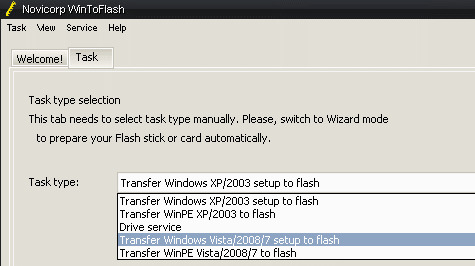
  4. Click on Taskwintoflash1
  5. Choose, “Transfer Windows Vista/2008/7 setup to Flash” and click Createwintoflash2
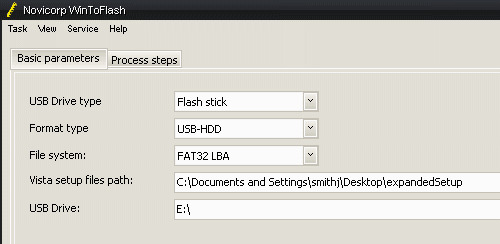
  6. Select your “expandedSetup” folder for the Vista setup files path
  7. Choose your Thumbdrive location.
  8. Click Create and wait for it to create your bootable Windows 7 upgrade USB drive.

From there you just need to Install Windows 7 like normal.

Related Articles

Comments

  • Pissed 2010
    Basically we all got ripped off. And of course there is 2000 websites that have these "this is what you should do
    ' @#@$#@%#$^%"! How about we just go to our bank and dispute the damn charge and screw them right the fuck back! Picture my middle finger frozen and me giving them a sand paper rubber and an empty Vaseline jar.
  • btr2bepissdoffthenon
    nobody got ripped off, yes it is compcated to install but anybody , should be able to make an iso off the files that are provided , we paid 30.00 some dollars for a 200.00 program , you can pay the 200 if u wish to have it easy , im not saying it was awsome of them to give us the files like they did but cmon you get what you pay for
  • crutsc
    Please Help, I cannot locate the following
    6.Select your “expandedSetup” folder for the Vista setup files path.
    The path in the example is no where to be found on my computer, I hate VISTA, If this machine had XP on it I would know exactly where to look. However, after C:\ there is no Documents and Settings ?????
  • Jason Maher
    I have tried to unpack and burn an .iso for 4 days now unsuccessfully. Somehow something I did has seemed to work so far. I burned the .iso and now I am currently installing Windows 7 Professional x64 using the custom install option. I will let you guys know if it works in the end.

    Thanks for all of your help!
  • Luke
    I cant find my product hey that window 7 upgrade gave me. little help here please
  • Grant
    Looks like digitalriver is now offering a downloadable ISO file for copying to a DVD or flash drive. Although they do not make it easy, as you have to first contact customer service. I emailed them about 24hrs ago and have yet to receive a reply. Anyways here is the link with the information. Good luck.

    http://drh.img.digitalriver.com/store/mswpus/ContentTheme/pbPage.Upgrade
  • Chester
    I'm pretty sure the Student discount version of windows 7 that they offer is the full version...
  • Douglas
    Okay here is the deal in case you guys were wondering..

    Its been a hard couple of days, but now I have two copies of W7 Pro. One is from Digitalriver.com and the other I ordered by phone from 1877 My MS-Store. I downloaded both and they appear to be identical. The version from MS store is NOT an ISO like digitalriver.com and is offered as 3 files. Although the guy from MS Store had answered my question that the download was indeed an ISO, which was obviously an ignorant lie. How come the people at call centers have no clue about the products they are offering?

    Let me rant:

    I was on the phone with ms store for about 2 hours total dealing with issues and language barriers (not surprising since the guy who said, "Hello my name is Robert" was clearly just a labeled name to make you feel better. After 30 minutes of questions and trying to get the few lines of information (name, address, email, cc info, etc) I ordered the download version with the backup option. Now I would have just gotten the DVD copy for 29.99, but apparently they were sold out. But after being put on hold, "Robert" told me that both the DVD and backup copy were the same. Weird. Anyway, it turns out the confirmation email got filtered as spam so I didn't find it at first. It also turns out that Robert got my address wrong by 1 letter, an 'n' instead of an 'm". This was even after confirming the whole order, letter by letter by letter. Apparently it has become very difficult to distinguish how to pronounce n and m.

    So I had to call back and correct the error which took the rest of my afternoon to accomplish due to how MS Store handles there calls and unfortunately how each call center person follows scripted lines. I called back 2 hours after the order was placed. First MS Store couldn't do anything to fix the error and I was given another number to call. After calling the new number, still they were unable to fix the error. Saying that my order was already processed and had shipping out (clearly a lie because UPS does not pick up on Sunday at 3pm EST!). Nor could he cancel the order or refund the order. I was told to call UPS to let them know of the error (which I refused to do). After being put on hold again and again to "look into this information closer" (I mean come on, can't they think of something else to say to the fact that they are probably taking another call and just waiting for me to hang up!?!). This was all but too frustrating and a supervisor was put on the phone to work out the issue. She also could not do anything and so it holds that there is chance I will not get the backup media. In which case I will have to call again and god knows how long that will take.... There, so make sure all the info is correct before you hang up with "Robert" or "John".

    Douglas
  • Matt
    I extracted the expanded setup folder to my desktop, and ran the command, and got this error:
    ERROR: Failur enumerating files in the directory "C:\Windows\System\ûU2\". Can anyone provide me some help? I'm a novice when it comes to dos.
  • Andy R
    I got this too. My command prompt opens at c:\windows\system32 I used the command cd c:\ to change it to c:\ and then it worked
  • Ben
    Here is a petition to try to put some more force behind getting Digital River to do the right thing, versus getting stuck in tech support hell:
    http://www.petitiononline.com/ISOftw/petition.html
  • dax
    Can you just burn the contents of the usb flash to a dvd afterward, and have a bootable win 7?
  • Douglas
    Okay, I followed the instructions and installed Windows 7 over my existing Dell OEM Windows XP MCE. I created the bootable cd and loaded it, then restarted my computer. The setup ran just fine and I got into the partition area of the setup.

    I wanted a completely fresh install, so I risked having to reinstall everything all over and decided to format the OLD partition of Windows Xp in the Windows 7 setup. I then created a new partition for W7 to install and everything went fine without a hitch.

    I entered my product key supplied by the office steal website when i ordered W7 pro. When I got into W7, i was worred about activation. Initially I got some weird error which is think is because I was installing updates. I tried a second time and what do you know? W7 is now activated!

    NOW, the question I have is I'm the type of person who usually reformats every 3 months or so. When that time comes, do you think I'll have to reload windows xp mce just to be able to install W7 again? Or since I previously activated the software for W7, will it let me do a fresh install from the same iso DVD I created? That is the question in which I have not found an answer for.
  • Tim W.
    I followed the steps for the usb boot but when I select to boot from the usb it just has the little dash flashing up in the corner.

    The rest of the screen is blank and nothing happens. Any help would be greatly appreciated.
  • Brandon C
    I have having the same issue as Tim W, I followed the steps here to make the bootable iso and when I try to boot from the drive I only get the little blinking dash mark.
  • Jon
    Same here. I think something is amiss with the bootable flash drive instructions.
  • Josh
    When I made a bootable flash drive it let me get as far as setup, then there's an error saying that it cannot open the install.wim file.
  • Palehorse864
    This isn't working for me. I can't get past the unpacking of Win7 64 bit Professional from Digital River because of an "unspecified error".
  • Duke
    This doesn't work, I tried this command in windows xp with alt locations and i just get errors, is right?
  • Dave Powers
    I made the bootable usb drive but I am wanting to install a clean install over my current vista files and install. How is this done?
  • Graig
    Making the bootable disc worked fine, and I was able to install Windows 7, but my product key is for an Upgrade only so it won't work with a clean install. What now?
  • Zach
    Graig, complete the installation without a product key. Once you're in, run the upgrade DVD from within Windows, and then choose upgrade. Then when it reinstalls, you'll be able to use your key. I ran into the same problem.
  • Finlay
    I've had the same problem. I love that you can 'Upgrade' Windows 7 to Windows 7 to bunk out the serial issue :)
  • thank you so much...i did get stopped by that upgrade, no bootable iso BS!
  • Great! I was incredibly frustrated that there wasn't a bootable option.
  • Jeff
    If you wanted the "Official" bootable DVD option, you have to order the #13 disc from DigitalRiver. That's a bit of a ripoff in my opinion...
blog comments powered by Disqus

Notebooks.com Shopping Tips and Deals

©2010 Notebooks.com. All rights reserved. Privacy Policy | Archives | Advertise | Sitemap