Welcome to Notebooks.com

Notebooks.com is a destination for mobile tech news and reviews. Visit our deals page for the Latest Tech Deals and Coupons.

ThinkPad X200 Review

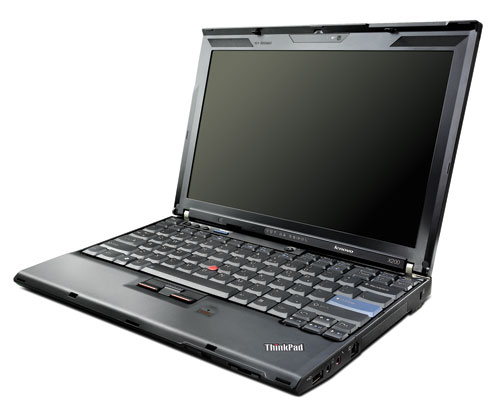
Lenovo officially introduced the ThinkPad X200 today, but was kind enough to send me an early review unit last week. The X200 is Lenovo’s new 12-inch business notebook and it’s been a joy to use for the past few days. The X200 has a starting price of just $1,199, making it an excellent value for anyone who needs a fully-capable notebook that can get them through a full work day.

The X200 is now available from $1,434 in its basic configuration.

Lenovo’s revamped the ThinkPad line’s naming convention, with the X200 replacing the X61.The X200 has a widescreen display, which is a departure from the standard (4:3) aspect ratio found on the X61.

The X200 is a whole different animal than the 13.3-inch X300, which is optimized to be as thin and light as possible and has a low-voltage processor, built-in DVD burner, and a solid state drive and has an eye-popping sticker price of $3,225. The X200 doesn’t have an optical drive, but it does have full-speed Intel Core 2 Duo processors, an array of drive options and an optional docking solution.

The X200 still feels extremely solid and well built. It might not win any beauty pageants, but that’s ok since the X200 is all business.

The X200 is extremely fast for an ultraportable. Launching Microsoft Office applications is virtually instantaneous and the X200 ripped through installing applications and editing photos.

With the standard 4-cell battery the X200 weighs in at 2.95 pounds, but power-hungry users will want to order a 9-cell battery that protrudes from the back of notebook and adds a few ounces.

The review unit Lenovo sent me came with the extended 9-cell battery, which is rated to last up to 9.3 hours. I wish I could say exactly how long the battery would last, but I can’t because the thing lasts just too darn long. The battery meter read 56% remaining after using the X200 with web browsing for a hair over three and a half hours.

The X200 is extremely quiet, even when the hard drive and fans are spinning. When using it on battery power I never felt any heat coming from the bottom of the notebook or the palm rests.

Lenovo equiped the X200 with a full-sized keyboard that is very comfortable to use, as you can expect from an enterprise-class ThinkPad. The X200 has an UltraNav (eraser-head style) pointer instead of a trackpad, which is easy to use for some, but despised by others. I recommend pairing a bluetooth mouse with the X200 for extended use.

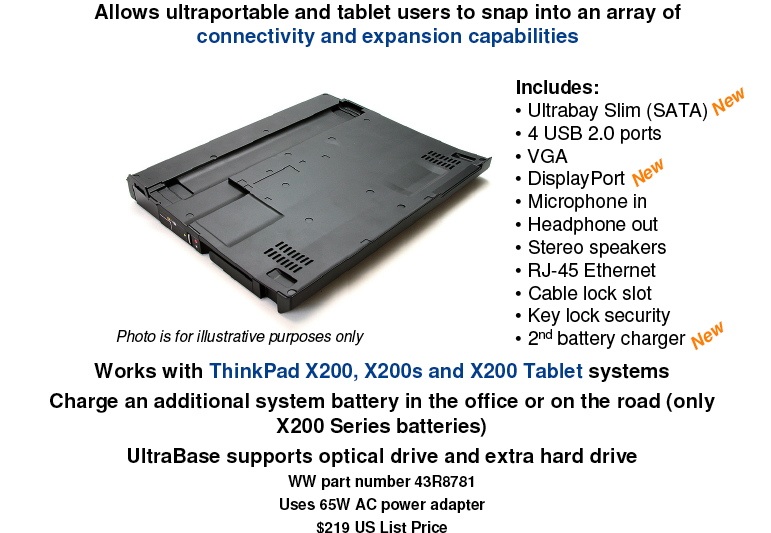
The X200 doesn’t have an optical drive, but it can be docked with an UltraBase that packs a DVD burner, four USB ports, a Display Port and more. The UltraBase can pack an extra hard drive and can charge an extra battery while plugged in- a great feature for business travelers.
Lenovo’s really improved the user-interface, obviously taking design cues from Windows Vista and made mundane activities like connecting to a network and adjusting power settings pleasant.

Like all ThinkPads, the X200 has a comprehensive suite of security and recovery services.

One minor thing that bugs me is Lenovo’s logo, which stands on its own and looks like an afterthought. Another negative is that the X200 only has a single speaker, which isn’t good for much except for system beeps. If you’re going to listen to tunes while you work on the X200 headphones are an absolute must.

The X200 is a classy business notebook that leaves little to complain about, especially considering its price point. The X200 will be available on August 5 directly from Lenovo and through channel resellers.

X200 Pros:

Long battery life, UltraBase, updated ThikPad user interface, Cool and Quiet.

Cons

No integrated optical drive, poor sound quality, could improve aesthetics.
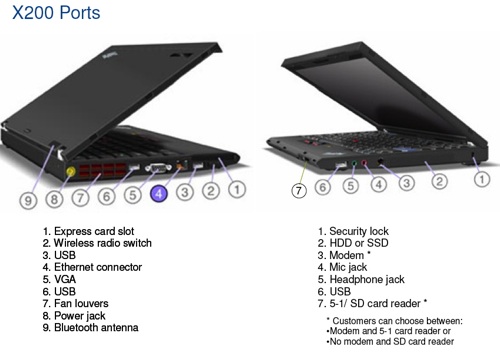
ThinkPad X200 Specs:

ThinkPad X200 Hard Drive Options: 80GB, 160GB, 250GB and 320GB (5400rpm); 100GB and 160GB (7200rpm) or 64GB SSD.

ThinkPad X200 Ports: 3 USB 2.0, VGA, Headphone, Microphone, modem + 5-1 media card reader or no modem + SD card reader, ethernet, express card slot

ThinkPad X200 Processor
Intel Core 2 Duo processor P8400 (2.26GHz, 3MB L2, 1066MHz FSB)
or
Intel Core2 Duo processor P8600 (2.40GHz, 3MB L2, 1066MHz FSB)

ThinkPad X200 Memory: up to 4GB; PC3-8500 1067 MHz

ThinkPad X200 Display and Graphics

12.1 WXGA, Intel Integrated Graphics X4500

Related Articles

Comments

  • This netbook is good for business purpose. Work is done at a great speed. Features and design, both are very satisfying. Keyboard is quite comfortable. It is very user friendly and battery life is quite long.
  • I like the lenovo x200 laptop,and I have one.But original battery is not good,so I bought a replacement from http://www.lenovo-batteries.com/cheap-lenovo-th...
  • With the standard 4-cell battery the X200 can not meet the requirement of me.
    I have also find the online battery website, which is so attractiven to me.One year warranty and 30 days money back! Shipping all over the world. Shipping fee: USD:10
    http://www.hunt360.net/ibm-thinkpad-x200-series...
  • oyeniyi
    iam oyeniyi i like to meeting this cite now becos iam businessman if you gen be my accseting for now
  • oyeniyi
    iam oyeniyi aderopo laptop and camera is relabeled now if is relabeled i want you to send it to my email.. oyeniyi_aderopo2007@yahoo.co.uk
    ok
  • relay_fi
    I don't like the X200 at all, it’s too big, too ugly and has too high dpi.

    I was the user of X32 and now I am using an X60. I like the form factor of X60/X61, only wish if Lenovo can upgrade the hardware and solve the palmrest heating problem. Then it will be a perfect machine for me. When X200 came out, I was initially very interested in it. But when I saw the picture, I was really pissed off. For hell's reason why someone in year 2008 should come up a computer with such a HUGE bezel, that's for 1990s. Moreover, I do not see any reason should an ultra portable to become BIGGER! The keyboard on X60 was perfect and I cannot feel any different from typing on X60 and on any decent desktop keyboard. The DPI on X60 was also just fine, even though it was already a bit high. I would prefer 1024x768 on a 14 inch, but on 12 inch is somehow manageable. The X200 came up a monitor with resolution of 1280x800 on a smaller (and wider) 12 inch; I have to question the rational for such 12 inch widescreen - to watch movies? ThinkPad should be a business machine; I need to see text clearly. No movies, thank you!

    BTW, no webcam thanks. I just want a small, light, and beautifully engineered machine like X60 with some updates. LENOVO, please come up with an X62, not X200!
  • homerx200
    Unfortunately relay_fi, 4:3 notebooks are basically impossible to find now. I was very disappointed too when I found that Thinkpads now only come in widescreen formats, but that has not stopped me from still using them. It's very frustrating when all manufacturers cater to the masses who watch movies on their laptops. What ever happened to editing documents and writing code?
  • Karl
    I bought a x200 a couple of weeks ago. I LOVE IT. Great screen. Fast. Great battery life (over 6.5 hours with WIFI on, and screen full brightness). Wonderful keyboard. No downsides yet.
  • Not saying it's horrible Richard, I just don't like how the lenovo logo looks on the matte ThinkPad lids.
  • The U.S. unemployment rate is climbing and everyone is feeling the affects of the bad economy. Millions are being laid off as wide spread job loses occur across nearly all private-sector industries. Have you or your spouse been laid off? With only one steady income how is your family going to get by? This question is on many people's minds as more layoffs are announced on a weekly basis.

    If you are in need of money for groceries, medication, education, monthly bills and more consider a payday loan. We match you with a top national lender who best fit your needs. You can receive up to $1,500 quickly by completing the simple online application. The process is simple, secure and confidential. If accepted, you receive money directly deposited into your bank account in as little as 24 hours.

    With a short-term loan, we can help you get by until your next payday. We address your immediate financial needs today. Don't struggle to get by when there is an effective solution waiting for you.
  • If you’ve gone through a breakup, there may be some anger in you. Brainstorming your ideas is a good way to physically weed out all of the negative energy,” said Roberts. “Get it all out in your brainstorm so that when you’re ready to write your poem, not only do you know what you want to say, but you also know what you don’t want to say to your loved one
  • Richard Greenblatt
    "...could improve aesthetics" ?

    I don't think so. It's wonderful, so nerdy, so geeky... I love it.
  • When you are separated by distance, a “missing you” love poem is a thoughtful way to convey how much you care for another when you can’t be together. Obviously buying a Hallmark card at the corner store would be easier, but whoever said love was easy? Writing a heartfelt poem that truly expresses your most personal feelings is a good starting point for getting that certain someone back into your arms. Here are some love-poem writing tips that will inspire you:
    Brainstorming your feelings sounds kind of bizarre, but it is a writing exercise that will greatly benefit you. Writing love poems for missing your loved one is no easy task. You want your poem to be inclusive of everything you are feeling, including the words you wish you had said before parting. Is there something you wish you had done differently? If so, include the details in your brainstorming session. Whether you’ve gone through a breakup or your loved one is currently living away from you, it can be an emotional time. Published poet and writer, Anne Roberts, suggests brainstorming to not only focus your ideas, but your feelings as well.
blog comments powered by Disqus

Notebooks.com Shopping Tips and Deals

©2010 Notebooks.com. All rights reserved. Privacy Policy | Archives | Advertise | Sitemap