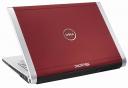
 The Dell XPS M1530 is the latest update to the company’s high-performance notebook line. The XPS M1530 is built of magnesium alloy and aluminum, giving it a high-class appearance at a reasonable $999 entry price. Available in a black, red and white, the XPSM1530 can be loaded with a Blu-Ray disc burner and a solid state drive.
The Dell XPS M1530, with a 15.4-inch diagonal widescreen display, is a larger version of the compact XPS M1330, which has a 13.3-inch display. The M1530 is slim, measuring just 1-inch tall when closed and has a much more ‘premium’ feel compared to Dell’s Inspiron line.
For current pricing, click here to visit the XPS product page.
XPS M1530 Deal for June 2008: XPS Summer Savings Event: Mobile Entertainment Powerhouse XPSâ„¢ M1530 Laptop $1199 after $599 off (expires June 19)
It is available in three pre-configured packages, but Dell customers can customize their M1530s to their liking. All XPS M1530 models have Intel Core 2 Duo processors, NVIDIA GeForce GPUs and a 2.0MP camera built in.
 The base (Good) XPS M1530 is $999 and comes with a 1GB of RAM, a 1.5GHz Intel Core 2 Duo processor (T5250 2MB L2 cache), 128MB NVIDIA GeForce 8400M GS graphics and high-def audio. It comes with Windows Vista Home Premium. It comes with a DVD/CD burner and 802.11g wireless. This is a respectable configuration, but users should definitely upgrade to 2GB of RAM for $125, or order a 2GB upgrade kit from a retailer for about $55 and install it themselves.
The “better” XPS M1530 configuration from Dell costs $1,099 and is similar to the base model, but it has a 160GB hard drive instead of the 120GB drive. It also has 802.11n wireless, which is much faster than 802.11g wireless if you have the proper router. It comes with Trend Micro PC-cillan, an anti-virus and security suite, and Microsoft Works 8, a productivity suite for home users. The hard drive and wireless upgrade are each $50 a-la-carte, so the software is essentially free if you go with this package. As of launch date, this configuration cannot be customized as much as either the “good” or “best” versions and is only available in black.
The “best” XPS M1530 configuration is $1,499 and features the much more powerful NVIDIA GeForce 8600M GT GPU with 256MB of memory. If you’re into gaming or other heavy-duty multimedia apps, this configuration is for you. It includes 2GB of RAM, a 250GB hard drive and the 1.66GHz Intel Core 2 Duo processor (T5450).

XPS M1530 DVD or Optional Blu-ray Disc Burner
This is an option you should order only if you’re absolutely certain that you’ll put it to good use. With the HD format wars still raging, it’s still too early to tell if both HD DVD and Blu-ray will survive, or if one will triumph over the other. You can play back Blu-ray discs and connect to your HDTV via the M1530’s HDMI port.
The Blu-ray drive can burn up to 50GB of data per disc, which is pretty incredible. This is useful if you want to backup a lot of movies and music and take it with you. If you don’t need to carry around all that extra data, you’re better off buying some high-capacity external hard drives. If you have friends and colleagues that also have Blu-ray drives this feature is particularly useful.
However, $500 is a steep price to pay for any laptop upgrade. Part of the premium price is “early adopter tax.” Prices on Blu-ray and HD-DVD burners should drop significantly in the coming months as they’re offered on more notebooks.
Most users will find the standard DVD/CD burner adequate for burning home movies and sharing music. Five hundred dollars can buy a lot of other upgrades that are more useful on a daily basis.
XPS M1530 Hard Drive
The Dell XPS M1530 is available with a range of hard drives or a 64GB solid state drive. The 64GB solid state drive offers the best performance in terms of reliability, durability and battery drain, but few users will pay the $1,000 premium for it. XPS 1530 users who have a respectable amount of multimedia will find the 64GB solid state drive extremely cramped. But if durability is your primary concern and you have deep pockets, the solid state drive is the way to go.
The cheapest hard drive available with the XPS M1530 has a 120GB capacity and spins at 5400 RPM. For $50 extra you can upgrade to a 160GB drive anda 250GB drive is a $150 add-on. A 320GB drive is also availabl, but not currently listed on the M1530 configuration page.
If you’re after performance you’ll want to upgrade to a 7200RPM drive. These hard drives are significantly faster, but each gig of capacity is much more expensive. The smallest 7200RPM drive for the XPS 1530 has a 120GB capacity and is a $100 option. The 160GB drive (7200RPM) is $150 extra and the 200GB drive (7200 RPM) is an extra $250.
The best option in my opinion is the 200GB (7200RPM) drive. It has 50GB less capacity than the largest 5400RPM drive, but the sacrifice is well worth the read/write speed increases.
XPS M1530 Processor Options
Any of the Intel Core 2 Duo processors Dell offers with teh XPS M1530 are adequate for everyday tasks and most users will find them plenty fast. However, XPS customers are usually looking for more than just adequate. For this reason, Dell offers a range of processors, including teh 2.6GHz T7800.
As of the XPS M1530 launch date the following processors are offered:
Intel Core 2 Duo Processor T7800 (2.60GHz,4MB L2 Cache,800MHz FSB) $575 Extra
Intel Core 2 Duo Processor T7700 (2.40GHz,4MB L2 Cache,800MHz FSB) $300 Extra
Intel Core 2 Duo Processor T7500 (2.20GHz,4MB L2 Cache,800MHz FSB) $175 Extra
Intel Core 2 Duo Processor T7250 (2.00GHz,2MB L2 Cache,800MHz FSB) $100 Extra
Intel Core 2 Duo Processor T5450 (1.66GHz,2MB L2 Cache,677MHz FSB) $50 Extra
Intel Core 2 Duo Processor T5250 (1.50GHz,2MB L2 Cache,677MHz FSB) Standard
Most users will get by just fine with the XPS M1530’s standard processor. The next step up, the T5450 has a clock speed that’s only 10.7% faster than the standard and won’t make the computer feel significanly faster. If you’re going to upgrade from the base processor you should get the T7250 for $100 extra. Moving up to the T7500, or any of the other processors with 4MB L2 cache, is the way to go if you can afford it. The T7800 is the top performer, but you’ll be paying top dollar for bragging rights of having the fastest processor. The best value for the money is the T7500 for $175.
XPS M1530 Memory
The XPS M1530 uses DDR2 SDRAM and can accommodate up two memory modules. If you’re on a budget, order 1GB of RAM and upgrade to 2GB or 4GB yourself. If you’ve got money to burn, you can upgrade to 3GB for $125 or 4GB for $375, which is a complete rip off in my opinion. I recently bought 4GB of RAM for my notebook for $220. Upgrading the XPS M1530’s memory takes just a couple of minutes and can be done by anyone.
XPS M1530 Display
The XPS M1530 features a 15.4-inch display, with a resolution of 1280×800 pixels. It is glossy, which many people prefer because glossy screens generally have deeper color saturation and look great under proper lighting conditions. Others (myself included) despise glossy screens, especially when used in bright rooms or outdoors. They are highly reflective and any amount of direct sunlight render them useless.
XPS M1530 Dimensions
This notebook is much thinner than most 15.4-inch notebooks, including Dell’s Inspiron series. However, the widely-advertised “less than an inch thick” measurement is only half true. The M1530 is shaped like a wedge, so its front edge is much slimmer than the rear edge. It’s still slim, but don’t expect a uniformly thin laptop like the MacBook Pro or the ThinkPad T-Series.
It weighs in at 5.78 pounds with a standard battery. It measures 14.06-inches wide and 10.34-inches deep. The thinnest part of the computer is .93-inch deep and the thickest is 1.38-inches deep.
These dimensions mean the XPS M1530 is slim enough to lug around all day for most users. But those looking for something that’s really light should look at a 13.3-inch notebook like the XPS M1330, Sony SZ series or Apple’s MacBook.
XPS M1530 Wireless Options
The XPS M1530 can be configured with up to three antennas to serve your wireless needs.Everyone should upgrade to an 802.11n wireless card. The cost is minimal and you’ll enjoy faster transfers and better quality connections from greater distances.
Bluetooth is optional and affordable at just $20. I recommend getting this since you likely already have at least one Bluetooth compatible device. I also despise USB dongles for external mice and keyboards.
The XPS M1530 can be loaded with the Dell Wireless 5520 HSDPA modem to connect to Verizon’s wireless network, or the Dell Wireless 5720 EVDO wireless modem to connect to Sprint’s service. Both are Rev.A, which is the fastest protocal available. Each costs just $150, but keep in mind that they come with expensive one or two-year contracts. My data plan with Sprint costs about $65 per month. It’s nice to be able to get online wherever you are, but it’s not a necessity if you’re usually in range of a reliable WiFi network.
XPS M1530 Ports
The XPS M1530 has three USB 2.0 ports to connect your iPod, Zune, printer, camera and other accessories. Both an HDMI and VGA ports are included to connect to monitors, TVs and projectors. A standard Ethernet port (10/100) can be used to connect to your home or business networks when wireless isn’t an option.
All XPS M1530 notebooks come with an 8-in-1 memory card reader so you can easily transfer your digital photos and videos,or use a card as an emergency backup. There is one ExpressCard 54mm slot for expansion and external accessories.
There are dual headphone/speaker jacks.
XPS M1530 Power and Battery
The standard battery is a 6-cell Lithium Ion battery (56WHr). An optional 9-Cell battery (85WHr) adds weight and sticks out from the XPS M1530’s sleek silouhete, but will last 31% longer. I recommend getting at least one extra battery if you’re highly mobile. One good option is to order one 6-cell and one 9-cell battery. Dell charges $90 extra for this combo.
Related Posts
-
At its first Surface reveal, Microsoft maintained that it started making hardware so that companies…
-
With the huge growth of gaming services like Steam and Microsoft’s commitment to bringing Xbox…
-
If you're looking for a cheap laptop, it's hard to miss the wave of inexpensive Chromebooks. But…