Written on August 10, 2007 by Xavier

iMovie ‘08 Adds Support for HDD & DVD Camcorders

iMovie ‘08 Adds Support for HDD, DVD, Flash Memory Camcorders The single most frustrating thing about switching to a Mac this summer was working with video from my hard disk drive camcorder. But Apple’s stepped up to the plate and added support for camcorders that use AVCHD and MPEG-2 formats, greatly improving workflow for users of camcorders that record on either hard drives or DVDs.

I picked up a Sony SR-300 camcorder with 40GB hard disk drive (HDD) earlier this year to speed up my video editing workflow and so I wouldn’t have to worry about swapping out tapes. Things were working like a charm on my Windows notebook, but when I switched MacBook Pro importing and editing video became unbearable.

To playback my camcorder’s video on my MacBook Pro I had to purchase a special Quicktime plugin from Apple for $19.99. I could watch videos, but in order to hear the audio I had to use Streamclip. To edit my videos I had to export clips from Streamclip in QuickTime or DV formats, then import the converted clips into iMovie.

This took forever, was exhausting and made me regret ever buying the SR-300 to begin with. Many Mac users have avoided Sony, JVC, Canon and Panasonic’s DVD and HDD cameras because of this problem, or sold them off after struggling to get them to play nicely with their MacBooks.

I was surprised overjoyed tonight when I found out that iMovie ‘08 fully supports my camcorder. I went to the Apple Store in San Francisco to pick up a copy of iLife ‘08. I took a seat at the Apple theater and started installing it on my notebook while an Apple employee was giving a presentation about Final Cut. My video editing needs are pretty basic, so I wasn’t paying close attention, but I did hear him say something about how Final Cut can import video from nearly any camera, including Sony’s HDD camcorders.

After the presentation I told him about my frustrations and asked him if I should upgrade to Final Cut to ease my pain and suffering. Then I heard the sweetest words I’ve heard in a long time…”Nope don’t worry about that, we took care of that in iMovie ‘08.”

After spending countless hours struggling with this problem I asked for clarification. He offered some simple, but great advice. “After you install iLife ‘08, plug in your HDD camcorder and you’ll see all the clips right away. ”

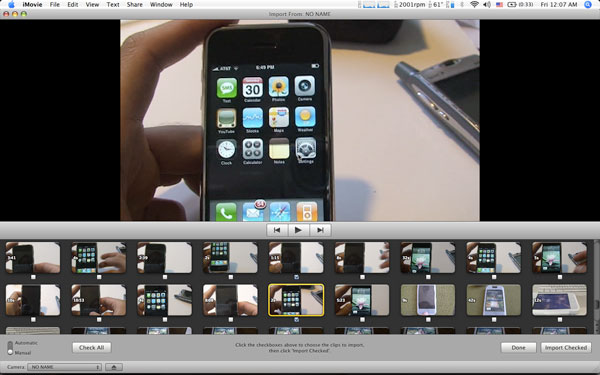
That’s exactly what happened once I got home and plugged my SR-300 into my MacBook Pro. I’m now able to preview each of the dozens of clips on my camcorder and chose which ones to import. Simple and it just worked! This is much faster than working with tapes or the screwy process I was using before. It took 14.5 seconds to import a three minute clip, but another 1:31 to create the thumbnails used to skim through the clip while editing in iMovie.
iMovie ‘08 Adds Support for HDD, DVD, Flash Memory Camcorders

I poked around on Apple’s web site and found the below list of hard drive and DVD camcorders that Apple has tested with iMovie ‘08. If you have similar models and are having trouble importing video, upgrade to iMovie ‘08 and just give it a shot.

iMovie ‘08 is far from being a professional solution, but at least I can now view and edit video from my camcorder. iLife ‘08 comes preloaded on all new Macs or is available for $79 for a single user license.

Brand Model Format Media
Sony HDR-SR1 AVCHD HDD
Sony HDR-SR7 AVCHD HDD
Sony DCR-SR82 MPEG-2 HDD
Sony DCR-SR100 MPEG-2 HDD
Sony DCR-SR300 MPEG-2 HDD
Sony DCR-DVD308 MPEG-2 DVD
Sony DCR-DVD403 MPEG-2 DVD
Sony DCR-DVD508 MPEG2 DVD
Canon DC50 MPEG-2 DVD
Canon DC220 MPEG-2 DVD
Canon DC20 MPEG-2 DVD
Panasonic HDC-SD1* AVCHD Memory
Panasonic SDR-S10 MPEG-2 Memory
Panasonic SDR-S150 MPEG-2 Memory
Panasonic SDR-200 MPEG-2 HDD
Panasonic VDR-D300 MPEG-2 DVD
Panasonic VDR-D310 MPEG-2 DVD
JVC GZ-MG505 MPEG-2 HDD
JVC GZ-MG155 MPEG-2 HDD
JVC GZ-MG555 MPEG-2 HDD

Filed under: Apple Notebooks, HowTo, MacBook, news

50 responses to “iMovie ‘08 Adds Support for HDD & DVD Camcorders”

iMovie ‘08 Supports HDD, DVD Camcorders, YAY!

August 10th at 11:53am

[…] iMovie ‘08 Adds Support for HDD & DVD Camcorders [Notebooks] tr { border: 0px } td { cellborder: 10px} table { border: 1px solid black } […]

Jdogg

August 12th at 9:12am

With your HDD based camera, did you connect via USB or firewire?

Xavier

August 13th at 12:04pm

Hey Jdogg, connected my SR-300 to my MacBook Pro via USB, there’s no firewire port on it.

joel

August 14th at 3:41am

hi! i ran out to the store too!

but found out that iMovie 08 and Sony’s HDR-SR1 avchd camera doesn’t import onto a Intel Solo machine! It wouldn’t work on my home Mac Mini..

Although all apple says i need is an intel processor… they’re wrong.

iMovie fire wire or usb connect? - EmiratesMac

August 14th at 12:11pm

[…] is this what you were looking for? Even I had a HDD and MPEG-2 based Video Camera (Sony DCR-SR100) and it […]

Xavier

August 14th at 1:13pm

Joel, what kind of error/message are you receiving when you try to import avchd on your Mac?

John Slaughter

August 19th at 2:52pm

The JVC GZ-MG130U HDD CamCorder is not supported. Still using MPEG Streamclip.

I tried everything. Renaming the MOD files to M2V. QuickTime likes them, iMovie 08 does not.

=(

Jeremy

August 19th at 4:50pm

Thank you very much for the article about using your DCR-SR300 with iMovie 08. I am, unfortunately, not able to use my Sony DCR-SR300 with iMovie 08. My MacBook Pro keeps saying that the files are MPEG-1 and are not “movie” files. Am I doing something wrong with the camera? Thanks for any help you can offer. Jeremy

Xavier

August 20th at 11:25am

Jeremy,

How are you trying to get your clips into iMovie ‘08?
You should just launch iMovie ‘08 and then connect your camcorder. Your SR300 should be recognized and you will be able to preview your clips.

Jo

August 20th at 5:47pm

Can anyone help me import videos from Panasonic VDR-D300? It’s on the list of cameras that should work.

It does not read the camera. Can anybody help please?

Xavier

August 21st at 12:57am

What happens when you plug the camera in? Try choosing “Import from Camera”

Jeremy

August 21st at 10:11pm

I have figured out the issue. For some reason when connecting the camera you have to choose “print” on the camera’s menu of how to connect to the computer, not, “computer”. Now it is working perfectly.

Christopher Key

August 25th at 2:33pm

will ilife08 work with a sonydvd305

Jeff

August 26th at 4:35pm

I have a DCR-SR100 (and am running imovie 08) and am having the same problem Jeremy had (not recognizing movies/showing up as MPEG 1), but select the printbridge option is not doing the trick. When I connect using the HDD/computer option my Mac does not recognize the device. If I hit the printbridge option, it recognizes my device, but I get an error message on my camcorder (”check the connected device”). In either way I cannot import the pictures. HELP!!!

Xavier

August 27th at 1:42am

Jeff,

I’ve found that my Sony Camcorder and iMovie ‘08 don’t always like to play together.
Try the following combos-
1) Start iMovie ‘08, plug in camera, chose ‘computer’ from on your camcorder’s menu.
2) Plug in Camcorder, start iMovie, chose ‘computer’ from your camcorder’s menu.
3) Plug in camcorder, selsct ‘computer’, start iMovie ‘08.

For whatever reason iMovie ‘08 does not seem to recognize my SR300. I know it’s frustrating to have to troubleshoot, but let me know if any of these combos work.

Jeff

August 28th at 5:58am

Xavier - thanks for the reply. I bought the Quicktime add-in that enables it to recognize muxed MPEG2 files and did option 3 above - not sure what did the trick, but it worked. I have purchased my last Sony product.

Mohd Hisham Saleh

August 30th at 6:59am

I’m still having issues with this

My cam is VDR-D310 / DVD-RW

1. If formated as Video DVD without finalize it launch CD Blank Finder
2. If formated as VR DVD it detect as DVD ROM
3. If formated as Video DVD and finalize it launch DVD player

So the problem still unsolved. Any help any one. Should i get DVD-RAM dvd types? and go again with all this exercise

NCL

September 2nd at 1:18am

Help! I just want to use iMovie ‘08 to edit the video files taken using Sony DCR-SR100. I have an error that says “That file is not a movie type.”

I was so happy with my purchase of a new iMac 20″ 2.0GHz Intel Core 2 Duo that comes with iMovie ‘08. Now I am a very frustrated person because I thought it would be just a breeze to make movies.

I spent 2 days surfing the Net reading on MPEG format and Apple products like iMovie and Quicktime.

There is an article that says that iMovie ‘08 supports DCR-SR100 that records in MPEG-2 format. It does not tally as when I used Finder to open a Sony video file. It shows that it is MPEG-1 format.

Whether it is MPEG-1 or MPEG-2, can someone plse tell me how do I just do editing with these files? I can’t open the video files at this point in time.

Sam Bocca

September 4th at 5:45am

I have the same issue as NCL.

The info panel says that my Sony DCR-SR100 files are MPEG-1. I’m unable to open these files in either Quicktime or iMovie ‘08.

Please help.

Sam Bocca

September 4th at 5:50am

From Camcorderinfo:

“Some current HDD camcorders’ file formats have proven to be incompatible with most non-linear editing programs by encoding their MPEG-2 files with an .MOD file extension. This has left consumers with no alternative other than the manufacturer’s bundled software, which is generally inferior to an advanced editing programs like Adobe Premiere or Final Cut Pro. The SR100 avoids some of these compatibility issues by formatting video files with the .MPG extension…”

The mac does not appear to be fooled.

Molly

September 8th at 6:15pm

Thanks Xavier! #3 in your list of “How to Open Files” for the SR-300 worked for me this evening.

Cheers!

david strong (in New Zealand)

September 10th at 3:53am

Another Frustrated iMac convert…
Hi, I’ve read the above and haven’t had any luck adn would welcome any advice. I’ve a Sony DCR SR80 and have downloaded numerous MPEG-1 files from it onto an XP machine. I’ve now bought the new dual-core iMac 20in (with iLife 08) and copied the video files from my xp machine onto a DVD and pasted them into the iMac. But they don’t work and like Jeremy, the iMac tells me that they aren’t movie files. This is really frustrating.
Any help????

Xavier

September 10th at 1:53pm

Hi David,

You can’t import MPEG-1 files into iMovie ‘08 unfortunately. Instead you need to convert them into iMovie after they’ve been converted into MPEG-2 or MPEG-3. This is a pain, but can be used by using an application like VisualHub to help automate the process.

Many pro video apps can do this, but obviously if you had the pro versions, you wouldn’t be using iMovie…

Let me know if this helped.

LeoK

September 13th at 4:53am

Hello all,

Just wanted to add the DCR-SR60 to the list of working devices; installed iLife ‘08 and had issues at first. iPhoto keeps opening and trying to grab all the video from the camcorder but if I close iPhoto and open iMovie ‘08, it will automatically import the video. Imported video looks great.

I also tried just letting iPhoto ‘08 import the video so I could just browse it from iMovie ‘08 but iPhoto doesn’t import the mpeg2 files properly. iPhoto brings in the video without sound, like the QTMpeg2 add-on did before.

Hope this helps someone.

LeoK

Chandler

September 13th at 1:16pm

I am not a big time filmer, but was trying to make some goofy vidoes for youtube, and using a Sony Cybershot 7.2 I took a few videos. I plugged the camera in and the movies were imported via iPhoto and came up as .mpg files on my desktop. However, I can’t drag these into iMovie to bundle them together. I read above that iMovie doesnt support mpeg-1 files, and was wondering if somebody could offer some help on what to do. I know very little and tried reading up, finding apps to convet and such but to no avail.

Cheers

Xavier

September 13th at 4:36pm

Chandler,

Don’t let iPhoto import your movies. Instead, quit iPhoto and start up iMovie ‘08 to import your movies. This may not work since your Sony camera isn’t officially supported, but give it a try.

Otherwise you can try VisualHub, an application that should convert everything for you. Another application you can try to use is StreamClip.

Dave Johnson

September 15th at 11:32pm

I have the same set-up as Xavier (SR300 and Imac) imported to imovie 08 - the video looks great, but no audio!?@?#!

Any help?

Kelli Shaw

September 19th at 2:32pm

After browsing many forums and finding no detailed results I decided to play with my Sony SR 82. Just go to the home menu and press the formatting button (the luggage tag looking icon) and then press the formatting button on the left for your hard drive or the right for your flash disk. Let it format and then it’ll be ready for imovie 08. Just plug the USB to the computer and open imovie.

Jeremy

September 21st at 6:44pm

After I had the camera syncing for a couple times it stopped working. I went to the local SonyStyle store and found a knowledgeable salesman. He gave me the following fix:
1. on the home page go to the toolbox icon in the lower right corner.
2. scroll down
3. go to output settings
4. select disp output
5. choose v-out/panel

i don’t understand why but, it now seems to be syncing with iMovie 08 without difficulty, both video and audio.

i hope it continues to work!

Good luck!

David

September 22nd at 4:11am

I have a JVC GZ-MG505 which records into .MOD files. When I connect the camera the import window opens but doesn’t display any thumbnails- all the scenes are just grey tiles.
Then when I import a scene the visuals come out fine but there is no sound.
Please help!

suzanne

September 22nd at 8:00pm

hi. as soon as i read this site . i bought ilife 08. but when i connected my sony dcr dvd 403. it would say no camera is connected. i am using my usb for connection. and on choosing a format to create a new project i don’t have mpeg 2 only mpeg 4. am i doing something wrong?

please help!!!

Xavier

September 24th at 11:19am

According to Apple, when you insert a new disc into your camcorder you need to make sure to format the disk correctly. If ‘VR’ is selected when you insert a new disk your Mac won’t read it as data, but as a Video DVD.

This will help you with future recordings, but it’s going to be a roadblock on your old disks if they weren’t formated in standard mode.

I’d suggest using Stream Clip to get your old video clips converted into a format iMovie ‘08 will like. StreamClip is a free download - http://www.squared5.com/svideo/mpeg-streamclip-mac.html
From Apple’s web site:

If you will be importing from some DVD camcorders* into iMovie ’08, make sure you select the correct option when you first insert the recordable disc into the camcorder. When you insert the recordable disc into the camcorder, you are prompted to select either the “Standard” (sometimes called “Video”) or “VR” format. The camcorder should be in the “Standard” or “Video” mode to import the media into iMovie ’08. If “VR” is selected, the camcorder appears in the Finder as a DVD and not as a hard drive, which means the media cannot be directly imported into iMovie ’08.

danmec

October 8th at 2:33pm

I am thinking of purchasing a JVC GZ-MG555. Does anybody have experience with this camcorder and does it work well with iMovie? I see it is on the list of “approved camcorders,” but I wonder if it is really the case that it plays well with the mac?

michaelmallalieu

October 9th at 2:34am

Hi there,

I have just purchased a new “sony-HDR-SR7″ model camcorder and also an “imac” intel core 2 duo 20inch.

I am a very keen filmmaker but am struggling to get my camera to connect, I am using a USB connection but not sure if it is the right one,
the connection obviously works as it imports the still photos into iphoto but for some reason i cannot seem to get it to open up in imovie to import clips, any help would be muchly appreciated, Cheers.

Xavier

October 9th at 5:12pm

Michael- sounds like you have it hooked up correctly. Try pugging it in, pressing ‘computer’ on your camera and then launch iMovie. Then click on ‘File’ in the menu bar and select ‘Import from Camera.’
This should begin the import process. Try this and let me know if it doesn’t work.
This process is still rocky, and I’ve found that resetting my Mac and camera can sometimes help.

Shefield

November 1st at 12:39am

If you have MPEG-1 (many cameras use mpeg1) files that need to be used you will need to convert them to mpeg-2 or H.264 mpeg4. If you have Quicktime Pro just do file>export>mp4 and its done.

If you don’t have QT pro use a free program like Handbrake (which is actually better), quick and easy conversions to a compatible format.

Debbie

December 12th at 4:13am

I have a Sony DCR-SR300C (extra capacity). I have a new iMAC 20″ with iMovie08.

iMovie is actually crashing when my camcorder is connected. Even if I copy the files to a folder on the computer, it will not allow me to select any of files. They are shaded gray.
Are the files on your SR-300 *.mpeg?

Was the video show wide aspect or small? I am trying to figure out what the problem is.

Apple support is looking at this. It has been escalated to engineering.

I also took my camcorder to the local Apple Store and iMovie still crashed.

Any more information about what you did or the files that are generated from your camcorder would be appreciated?

Steve Springer

December 20th at 2:03am

I just wanted to let everyone here know that LeoK is a genious. Been browsing the internet for weeks trying to figure this thing out with the DCR-SR60…what he said works. Beautiful!!!!!!!!!!!!!!!!!!!!!!!!

Alain Gauthier

December 25th at 7:55pm

I had the same problem as michaelmallalieu where I could not import from my Sony HDR-SR7 into iMovie 08. I then followed Xavier’s advised and it worked perfectly. Thank you very much Xavier I as was starting to get frustrated and disappointed that this great camcorder was nor working with be beloved MacBook Pro.

Frustrated

December 26th at 1:59pm

I’ve got a similar problem with my sony dcr sr100 - when I start imovie 08 and then turn on the camera - imvoie crashes. I’ve even switched back to imvovie 06 and have tried using visual hub - but even that gives me a problem - apple script error messages that say no document could be created??! Help!!!

AISHA

January 1st at 6:11pm

Hello,

I have been able to download videos from my Panasonic VDR-D300 once I have finalized DVD-RW discs…but iMovie08 won’t even allow me to open videos recorded on a DVD-RAM. I recorded important events on DVD-RAM discs because I thought they were supposed to be the easiest to use. Can you tell me what I should do to get iMovie to download from DVD-RAMs? I’m really challenged with this whole thing.

Thanks

John

January 10th at 10:29am

Dear Xavier,
I am in the same boat but, I have a Sony DCR SR200 instead of a 300. My power book g4 .mpg”cant be imported ” Quick Time couldn’t parse it;-2048 What does that mean? I am operating on Panther with the intention to upgrade to Tiger tonight!!! Do you believe that this will allow me to access or transfer my video clips to my mac in I movie? I thought because mpeg-2 hdd would be the same ? Please tell what you think? I will post again after I get Leopard . Thanks john

Rhonda

January 20th at 5:03pm

I also have a Sony DCR-SR200. Just bought a Mac Book, Leopard and Imovie 08 are on there. What is the trick to get it to recognize the video as movie files. It recognizes the still images on it, but says the video files are not movie files. Any suggestions?

Scott

February 11th at 8:30pm

I tried and tried for my Sony DCR-SR300. I finally got it to work when I did like someone above wrote:

3) Plug in camcorder, selsct ‘computer’, start iMovie ‘08.

In iMovie, it still wasn’t showing me my camera, but then I noticed the red light on the camera flashing showing that the hard drive was being used. I waited for quite a while, then when the red light went out, the import dialog came up in iMovie with all my video clips! So, watch the red activity light on your camera, if its on or flashing, keep waiting, it just might work!

suzanne Cuano

February 25th at 6:30pm

i went to applestore and brought in my dcr dvd 403. i followed the steps in the apple website. like formatting my disc to standard /video and not vr. guess what. still doesnt work. they recommended me to get handbrake.

Devin

February 28th at 8:37pm

I recently bought iMovie ‘08 specifically so I could import movies from my Sony HDR-SR1. I’m having a couple of issues however.
1. When I connect to the computer the camera shows up as an external drive and I can see the video files but when I click on them I get an error that says “The movie could not be opened. This file is not a movie file.”
2. So I try to import using iMovie ‘08. I tried all 3 connection solutions Xavier suggested but to no avail. It still doesn’t recognize the camera and when I try to just go file-import files-then the camera, all the files are grayed out.

I’m about to pull out all my hair and blow up my computer/camera. Please help!

Xavier

February 28th at 9:54pm

Devin,

This Sony/Mac issue really is a pain. My own setup goes out of commission every once in a while.
I don’t have access to the exact Sony camcorder that you have.

The reason your files are grayed out is iMovie ‘08 can’t edit them without first converting them. You can only import files that are already converted.

I’m going to put a call into Sony and Apple to see if we can solve this problem once and for all.

Matt

March 28th at 10:13pm

Xavier, were you ever able to get definitive feedback from Apple? After I read your article and cross-checked the Apple site, I bought a Sony DCR SR200. (I have an Intel-based MacBook and just upgraded to iMovie 08.) My camera perpetually reads “Connecting,” shows up only as external memory on my MacBook, and isn’t reading. My movies remain grayed out. Help would be greatly appreciated.

imelda

April 7th at 9:11pm

Hi There.
Any solution if possible the SONY DCR-DVD908E can works with iMovie’08?

Please advise.

Thanks.

Judy

April 19th at 1:27pm

I am sorry that I read all of these comments. I just purchased Sony’s HDR-UX7 and am hoping I don’t have any of these problems. But I have to admit, I am now very nervous about the money I have spent. I am running Leopard and pray that makes a difference.


Please leave your comment below.

* indicates a required field

Mobile News Network

Notebooks.com Links