Written on July 12, 2007 by Xavier

Logitech MX Air Mouse - Gesture Based Navigation for Notebooks

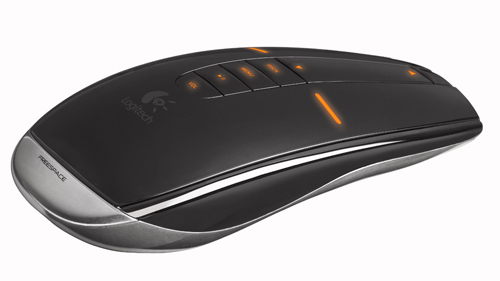
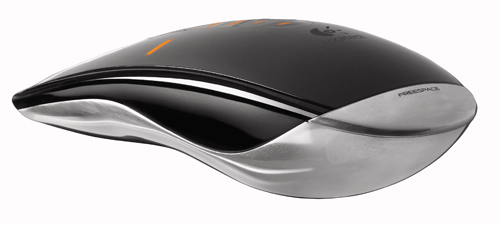
Logitech MX Air MouseLogitech is introducing an innovative wireless mouse that works on a desk or in the air. The Logitech MX Air Rechargeable Cordless Air Mouse let’s users control multimedia playback or any other mouse function with in-air hand gestures. This is similar to how gamers control the Nintendo Wii.

To change the volume, you press and hold the volume button and simply gesture – to the right to increase volume, or to the left to decrease it. For music applications, a small circular motion to the right activates the skip track command, while a circle to the left repeats the song.

Logitech’s using a technology it call Freespace to enable the gesture controls. This patented technology is based on a combination of MEMS (microelectromechanical systems) sensors, DSP (digital sprocessing) technology and RF (radio frequency) wireless technology. Freespace allow sa user to hold the mouse in any orientation, point in any directioand enjoy effortless, intuitive cursor control.

“The MX Air mouse offers a radically new way for people to control their PC entertainment,” said Rory Dooley, Logitech senior vice president and general manager of the Control Devices business unit. “It’s for anyone who has listened to music on their PC and been frustrated by having to return to the desk to change songs or volume. It’s for people who want to share vacation photos with friends and family without being tied to the desk. It’s for any of the millions of people using the Internet to browse and watch videos on sites such as YouTube or Grouper. And it’s for people with a living-room computer or media PC who want to navigate their media content
on their terms.”

Instead of a click wheel, the MX Air Mouse has a touch-sensitive scroll panel. There are several media functions on the scroll panel including paly/pause, volume/mute, back and select. The MX Air Mouse uses a rechargeable battery and a 2.4GHz radio, giving it a range of up to 30 feet.

Logitech has once again combined technology and style to make using a PC even easier. The MX Air Mouse will be available starting in August for $149.
Logitech MX Air Mouse

Logitech MX Air Mouse

Filed under: accessories, logitech, news

20 responses to “Logitech MX Air Mouse - Gesture Based Navigation for Notebooks”

New Logitech Mouse Works Like Wii Controller - Ministry of Tech - The Best of Tech

July 12th at 1:59am

[...] have taken a leaf out of the Wii’s book, and created a mouse that works by recognizing movement. You can use it on the desk like a normal mouse, or move it [...]

Apple iPhone Blog » Logitech?s MX Air Mouse: a witches brew of lasers, MEMS, and RF geekmagic

July 12th at 3:01am

[...] Oh hey, that little fella looks familiar. Sure enough, the rechargeable Logitech MX Air Mouse we spied last month is getting real this morning. Touting Logitech’s “Freespace” motion control, the Air Mouse combines MEMS sensors with DSP and 2.4GHz RF technology for both gestural motion-control and traditional laser mousing about. The Air Mouse attempts to bridge the gap between mouse and remote control with a touch-sensitive scroll-panel (instead of a scroll wheel) and dedicated pause/play and volume control buttons positioned down the center of the device. Push the volume button and flick the mouse right or left to increase or decrease the volume, respectively, at distances up to 30 feet away from your PC. Niiice. Better yet, it’s shaped to impress when toted about in the trousers… gaRrrowol! Ships in the US and Europe for $150 sometime in August.%Gallery-4779%[Via Notebooks.com] [...]

Logitech MX Air mus at Pecekoll.se

July 12th at 4:11am

[...] Notebooks har storyn.  [...]

Mobility Site » Blog Archive » Gesture Based Navigation - Logitech MX Air Mouse

July 12th at 6:12am

[...] notebooks.com had this neat piece up on an innovative wireless mouse that works on a desk or in the air. Logitech’s MX Air Rechargeable Cordless Air Mouse let?s users control multimedia playback or any other mouse function with in-air hand gestures … pretty cool!  This is similar to how gamers control the Nintendo Wii. [...]

TextGuru’s Phone News: The best news about the latest phones!

July 12th at 6:50am

[...] notebooks.com had this neat piece up on an innovative wireless mouse that works on a desk or in the air. Logitech’s MX Air Rechargeable Cordless Air Mouse let?s users control multimedia playback or any other mouse function with in-air hand gestures … pretty cool!  This is similar to how gamers control the Nintendo Wii. [...]

Justin Blanton | Logitech MX Air Mouse

July 12th at 7:14pm

[...] Logitech MX Air Mouse. Is this the mouse that’s finally going to move me away from Razer? Does anyone have information regarding Mac support (the press release is silent)? If I can use this to control VLC from across the room it’s a wrap. © 1999-2007 Justin Blanton                    e v e r y t h i n g i s r e l a t i v e                    In partnership with [...]

Logitech’s MX Air Mouse: a witches brew of lasers, MEMS, and RF geekmagic

July 16th at 6:57am

[...] Oh hey, that little fella looks familiar. Sure enough, the rechargeable Logitech MX Air Mouse we spied last month is getting real this morning. Touting Logitech’s “Freespace” motion control, the Air Mouse combines MEMS sensors with DSP and 2.4GHz RF technology for both gestural motion-control and traditional laser mousing about. The Air Mouse attempts to bridge the gap between mouse and remote control with a touch-sensitive scroll-panel (instead of a scroll wheel) and dedicated pause/play and volume control buttons positioned down the center of the device. Push the volume button and flick the mouse right or left to increase or decrease the volume, respectively, at distances up to 30 feet away from your PC. Niiice. Better yet, it’s shaped to impress when toted about in the trousers… gaRowl! Ships in the US and Europe for $150 sometime in August.%Gallery-4779%[Via Notebooks.com] [...]

The Daily 071607 | Forty One Acres

July 16th at 7:55pm

[...] Logitech MX Air-A mouse that you can control much like a wand (or the Wiimote). I used to have a mouse like that my freshman year of college…but I’m sure they work much better now. I think I’m due for a new mouse anyway… [...]

Gyration Ultra R4000 Universal Remote with Motion Sensing Mouse | notebooks.com

July 17th at 2:04pm

[...] was a lot of buzz around Logitech’s Air Mouse last week, but the Gyration Ultra R4000 may be a better choice for those looking for an all-in-one [...]

BlogTrage » Logitech’s MX Air Mouse: a witches brew of lasers, MEMS, and RF geekmagic

July 26th at 11:46pm

[...] Oh hey, that little fella looks familiar. Sure enough, the rechargeable Logitech MX Air Mouse we spied last month is getting real this morning. Touting Logitech’s “Freespace” motion control, the Air Mouse combines MEMS sensors with DSP and 2.4GHz RF technology for both gestural motion-control and traditional laser mousing about. The Air Mouse attempts to bridge the gap between mouse and remote control with a touch-sensitive scroll-panel (instead of a scroll wheel) and dedicated pause/play and volume control buttons positioned down the center of the device. Push the volume button and flick the mouse right or left to increase or decrease the volume, respectively, at distances up to 30 feet away from your PC. Niiice. Better yet, it’s shaped to impress when toted about in the trousers… gaRowl! Ships in the US and Europe for $150 sometime in August.%Gallery-4779%[Via Notebooks.com] [...]

Experience Mobility » Blog Archive » Gesture Based Navigation - Logitech MX Air Mouse

August 4th at 7:18pm

[...] notebooks.com had this neat piece up on an innovative wireless mouse that works on a desk or in the air. Logitech’s MX Air Rechargeable Cordless Air Mouse let’s users control multimedia playback or any other mouse function with in-air hand gestures … pretty cool!  This is similar to how gamers control the Nintendo Wii. [...]

Logitech MX Air Mouse : Specs, reviews and prices.

August 4th at 6:24pm

[...] Via notebooks.com [...]


Please leave your comment below.

* indicates a required field

    Notebooks.com Sponsors

Notebooks.com Links