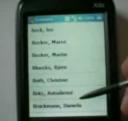
 Now you can make your Windows powered smartphone behave a little like an iPhone. Just install this simple application and you’re ready to scroll away.
Just install iContact, a free application for your Windows Mobile device that lets you scroll through your contacts by sliding your finger down the screen. iContact can be downloaded here
Check out this video of a Windows Mobile device running iContact.
via jkOnTheRun
Related Posts
-
Microsoft’s Windows operating systems let users do a lot of things. Every day, machines loaded…
-

Even though Windows 10 has made upgrading Windows easier than ever, sometimes you still need…
-
On August 2, 2016 the Windows 10 Anniversary Update came out with some cool new features…