Windows 7 comes with bunch of new features including Aero Peek, an x-ray like tool that lets you peer past your open windows to your desktop which is why some people refer to it as ‘desktop preview’. If you are using a computer with limited resources you may want to disable Aero Peek to use less RAM and get better performance out of fewer resources. Aero Peek is included in the home premium, professional, ultimate and enterprise edition of Windows 7.
This tutorial will show you how to disable Aero Peek, or if you need to enable it.
How to Disable Aero Peek:
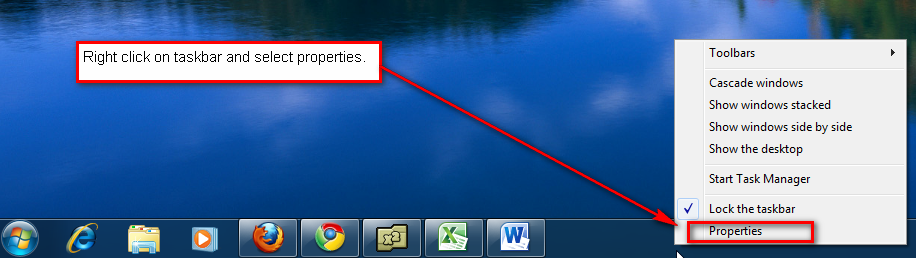
Step 1: Right click on empty area of your taskbar area and select properties.
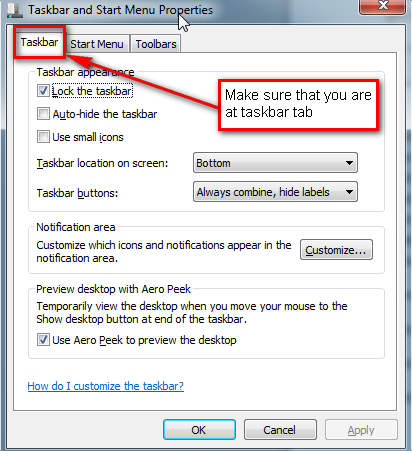
Step 2: Make sure that you are at ‘Taskbar‘ tab.
Step 3: To disable the Aero Peek uncheck the ‘Use Aero Peek to preview the desktop‘.
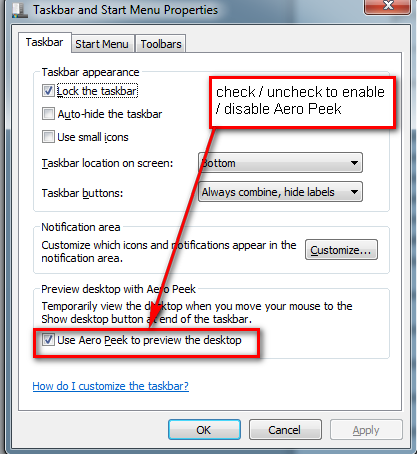
Step 4: To enable the Aero Peek check the ‘Use Aero Peek to preview the desktop‘.
Related Posts
-
The Windows 10 Start Menu looks a lot like the one that came with Windows…
-
Microsoft’s Windows operating systems let users do a lot of things. Every day, machines loaded…
-

Even though Windows 10 has made upgrading Windows easier than ever, sometimes you still need…