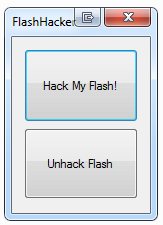
 If you’ve used dual monitors for any length of time you’ve undoubtedly tried to watch flash video like Hulu in full screen on one display while working on the other; and you’ve likely been disappointed with the immediate exit of full screen when you try to do anything else.
There has a been a fix for this for a while but it was a bit involved for many users who just want to watch fullscreen flash video while they work. Enter FlashHacker.
FlashHacker is a downloadable file that you can use to hack your flash for full screen flash video watching. Just download the file, unzip it and run FlashHacker.exe. Once you Click “Hack My Flash!” you’re good to go.
This is a great hack to keep in mind if you add a second display to your computer with one of the 2 DisplayLink USB to DVI adapters we are giving away.
The developer is currently working on a version that supports Flash 10.1, but you should be good to go with any other Flash version.
Hat tip to Lifehacker for pointing this out and letting us know that if it doesn’t work the first time to unhack flash and then try the hack my flash option.
Related Posts
-
The Windows 10 Start Menu looks a lot like the one that came with Windows…
-
The OS X Notes app got more powerful in OS X El Capitan and iOS…
-
The Microsoft Surface Pro 4 balances perfectly the needs of most laptop users who need…