 Low-priced, 720P HD pocket camcorders (palmcorders) are gaining market momentum and I believe consumers are drawn to the value proposition of low cost, high quality, portable, and convenient video capture and playback. As these devices proliferate, it leaves me contemplating how consumers will respond when they discover just how many of these notebooks or netbooks can’t effectively play back that content. Whether or not low end notebooks or netbooks were designed to do this isn’t relevant, as a recent NPD blog posting (citing new research) may suggest.
The Cameras
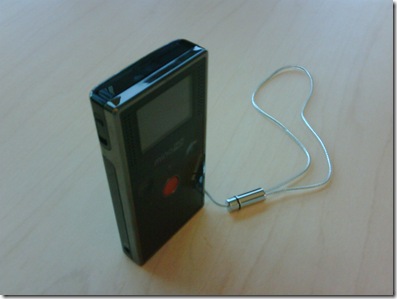
Let’s start with the cameras. I evaluated three different models, Flip MinoHD ($179), Kodak Zi6 ($148), and the Aiptek 1080 ($159). These cameras capture HD video at 720P resolution and 30-60 fps at around 10-12Mbps, which I consider mid-level HD video. Compare this to your typical Blu-ray movie peaking between 20 to 40 Mbps.
Compared to higher end HD camcorders priced into the $1,000s, many features have been removed like branded lenses, large magnification, optical image stabilization, night vision and auto-focus, just to name a few. In comparing between HD pocket camcorders, the differences are found in battery life, image capture quality, external display size, memory upgradability, and physical size.
Pervasiveness
To quickly gauge pervasiveness in the U.S., I sometimes use Best Buy shelving as a proxy indicator. In my last trip to my local Best Buy, these new class of cameras had 7 slots of shelf space, which is significant. Some models that use the lowest-cost clamshell packaging are even sold at Wal-Mart and Target next to $20 JPEG picture key chains and USB flash drives. In addition, many influential bloggers are picking up on these new HD cameras, which is sometimes a good indicator of future popularity. Amazon.com is an OK†indicator and these new HD palmcorders are relatively high in sales rank.
The Problem
As I see it, the problem is simple…. videos from these new cheap cameras won’t play well on many of the new inexpensive net/notebooks. If new research from the NPD blog is a future indicator, most consumers won’t know the capability tradeoffs between netbooks, low end notebooks and full capability (HD capable) notebooks. This could spell some real disappointment for users who may expect decent playback. In my testing on a typical netbook or real low end notebook, I get around 7 fps – close to a slide show. Think of it this way the HD palmcorder is smaller and cheaper than any netbook. Is it logical to assume the consumer will know that the video from the palmcorder can’t play on the bigger, more expensive netbook?
Different Solution Approaches
I suggest there are a few different ways that OEMs can solve these problems. They can:
1) Provide greater CPU power to decode the 720P HD video. This may also increase the heat, the fan noise and lower the battery life as well. (High end dual core CPU)
2) Provide an effective graphics solution that efficiently decodes, filters, and color corrects the image. (i.e: AMD 780G, ATI Mobility Radeon 3000, and competing solutions)
3) Provide a special decode chip that’s expensive and bounded to specific software. (i.e: discrete accelerator)
AMD’s Approach
Our approach is simple: apply the most efficient silicon to the challenge. In this usage scenario, the most efficient way is to decode the HD video with the GPU. Inside the GPU are special silicon blocks and special quality filters that are optimized for this function. We call this our UVD or Unified Video Decoder. It accelerates decoding of VC-1, H.264, and MPEG2 video and offloads the CPU for other tasks. UVD also applies quality filters against the video to make it look better, when using a supported player like Cyberlink 8. The result is amazing. Very low CPU utilization, keeping the system cool and very high quality image thanks to the filters provided by ATI Avivoâ„¢ technology.
Implications
If you accept that users will increase their consumption of HD video on their notebooks, disappointment for many will follow with low, ~7 fps HD experience or apply an appropriate GPU to execute the task. Another alternative is to invest resources educating consumers on the difference in capabilities between netbooks, low end notebooks, and fully capable notebooks. With the economy and budgets the way they are, I don’t see that happening anytime soon.
Real-World Efficiency in Action
I want to highlight my favorite example. The new HP dv2 notebook (based on AMD’s Yukon†platform technology for ultrathin notebooks) uses a superscalar AMD Athlon Neo â„¢ processor paired with ATI Radeonâ„¢ X1250 integrated graphics and optional ATI Radeon â„¢ HD 3410 discrete graphics to deliver not only full frame-rate HD video from these new HD palmcorders, but also higher end Blu-ray movies.
Conclusion
AMD has already anticipated the importance of HD video in multiple forms: low cost HD pocket camcorders discussed above, Blu-ray movie capabilities, and of course, some downloaded content. And we have responded with technologies that are in-market today. Big question remains: where does that leave netbook owners who expected their netbook to work with their even-smaller and less expensive HD palmcorder, even if that was never the design intent� It leaves them stranded on a non-HD island. Hopefully they have a second HD-capable PC at home, but if the NPD data is an indicator, they may not….
Related Posts
-
Carrying a bulky charger can really cut down on the portability of your notebook. We've…
-
Long a big name in smartphones and mainstream notebooks, Samsung is preparing to battle Alienware,…
-
The Samsung Notebook 9 gets an update according to the company's CES 2017 announcement that…