Written on July 12, 2007 by Xavier

Gateway M Series and T Series Notebooks Announced

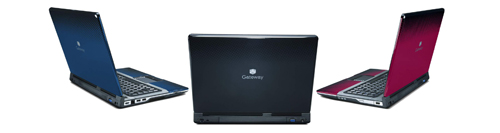
Gateway M-Series T-SeriesGateway’s launching two new notebook series that bring some much-needed style to the company’s lineup. The Gateway M-Series and T-Series will be available in several colors including Crimson Red, Slate Grey and Pacific Blue.

The Gateway M-Series has a 15.4-inch widescreen LCD, with an optional upgrade that delivers 1920 x 1200 resolution that displays 1080p HD content. The T-Series has a more compact 14.1-inch widescreen

The new Gateway notebook lines are completely customizable and can be equipped with the latest Intel Core 2 Duo processors. There are several multimedia options available or coming soon, including a HD DVD drive, Blu-ray drive, HDMI port and ATI Mobility Radeon HD 2400 XT graphics.

“The Gateway M-Series and T-Series deliver what consumers want in their notebooks - exceptional style and the latest technology,” said Todd Titera, senior manager, consumer products. “And although the elegant design of the notebooks conveys an exclusivity typically only available at a price premium, Gateway has designed these systems to meet the needs and budgets of a range of consumers. Anyone who wants to be envied will choose the notebooks for their first-class design and leading-edgeperformance and capabilities, while those on a more limited budget will be surprised that they can get such a stylish notebook with popular features.”

The first two models of the Gateway M-Series and T-Series notebook lines - the Gateway M-6816 and Gateway T-6815 will be available starting July 22 at several retailers, from $899.
Gateway M-Series T-Series

Filed under: Gateway Notebooks, Media Center Notebooks, Notebooks, news

11 responses to “Gateway M Series and T Series Notebooks Announced”

Sishir

September 16th at 5:07pm

How do u remove windows vista and install windows xp in gateway m-6816 laptop?? I am having terrible moment with it. My applications doesn’t work in vista so i want to install xp. if anyone please help me i m tired of finding solutions. You can send me email at msishir@gmail.com . Thanx @ advance.

Todd

December 8th at 10:15pm

Gateway M-Series - Uninstall Vista and install XP? What a nightmare! Drivers for XP on Gateway M-Series? FORGET IT. Save yourself a headache. Don’t buy M-Series; resign yourself to VISTA and pony up the bucks for software upgrades if you already bought an M-Series. Gateway support is absolutely worthless on this subject - and trust me - you’ll spend days and days looking for correct XP drivers with NO LUCK WHATSOEVER. Buy a laptop with XP pre-loaded.

Lusbi Jaudieh

January 15th at 10:59am

How do u remove windows vista and install windows xp in gateway m-6816 laptop?? I am having terrible moment with it. My applications doesn’t work in vista so i want to install xp. if anyone please help me i m tired of finding solutions. You can send me email at Lusbijaudiehcantv.net o Lusbijaudiehgmail.com

Ravi

January 31st at 3:32am

hi,
I am unable to uninstall windows Vista in my Gateway M-series laptop and install other versions of windows. It asks for drivers and i am unable to get any help.Can any one tell me how to fix it.

Chris

February 1st at 2:03pm

blah…wish i would have read this first!! i am in frickin’ vista hell! i have removed and installed xp but i cannot find any drivers!!!!!!!!!!!!!!!!!!!!!!! support was absolutely a joke with no information. Vista on this was so bad it’s unbelievable. locks and reboots about once per day. this is a frickin’ joke.

simon

March 24th at 11:12pm

how to uninstall vista and install win xp on my laptop gaeway m-series

Raymond Gilbert Concordia

April 3rd at 7:17am

How do u remove windows vista and install windows xp in gateway m-6825j laptop?? I am having terrible moment with it. My applications doesnt work in vista so i want to install xp. if anyone please help me i m tired of finding solutions. You can send me email at raymond_021@yahoo.com

Bob

May 3rd at 9:19pm

Can I reinstall vista and have back all my things?
(Video card,sound,etc) I had the same prob as you guys when I tried to install XP. Sad…and is it normal that the screen shuts down just like that?
I was surfing and suddenly the screen became black and I couldn’t do anything except to press the start button for a while until the laptop shuts down and restart it.I hate when it does that! That’s why I decided to install XP, and now I can’t find the freaking drivers! anyway please someone answer me.thx!

Jordan

July 2nd at 8:49am

I don’t know if anybody was able to solve the problem with the drives. I am having the same proble as many of you, I need to install XP on my M-Series but I can not find the drives. If anybody can help me I would really apreciate it.
jordanpar@hotmail.com

pedro

July 18th at 4:30pm

hey, I wanna to remove windows vista and install windows XP,in a gateway m-6813 laptop?, where can I find the drivers for my laptop?, you can send me email at pedro_berroteran@hotmail.com pedroberroteran@gmail.com
thanks

Moe

July 20th at 1:04am

Same issue here I have a t6321 with Vista, did a downgrade to XP and I couldn’t find a single driver. With all other laptop brands when you downgrade from Vista to XP, you are bound to find drivers for XP one way or the other.

Sadly this is not true with gateway, which is why the brand name is suffering, and won’t get much attention. Plus their website does not help and is lacking info. In fact I never heard of it until I got this laptop…I hate gate!


Please leave your comment below.

* indicates a required field

    Notebooks.com Sponsors

Notebooks.com Links